Getting Started: Developers
WepSIM Source Code
WepSIM GitHub Repository:
- Stable build: https://github.com/wepsim/wepsim
- Nightly build: https://github.com/acaldero/wepsim
The WepSIM architecture can be summarized in the following Figure (made by https://app.diagrams.net):
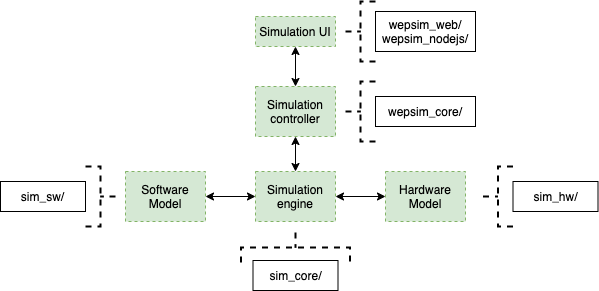
WepSIM engine API
- If you want to use the WepSIM engine within your App, there is a WepSIM API in JavaScript available too. You will need to include the WepSIM engine in your proyect:
- And then, one simple example of using this WepSIM API is the following:
  /*
   * Input: minimal firmware and minimal assembly code
   */

  str_firmware = 'begin {\n' +
                 '  fetch:  (T2, C0),\n' +
                 '          (TA, R, BW=11, M1=1, C1=1),\n' +
                 '          (M2, C2, T1, C3),\n' +
                 '          (A0, B=0, C=0)\n' +
                 '}\n' +
                 'nop {\n' +
                 '        co=010110,\n' +
                 '        nwords=1,\n' +
                 '        {\n' +
                 '                (A0=1, B=1, C=0)\n' +
                 '        }\n' +
                 '}\n' +
                 'registers {\n' +
                 '        0=$zero,\n' +
                 '        29=$sp (stack_pointer)\n' +
                 '}\n' ;

   str_assembly = '.text\n' +
                  'main: nop\n' ;


   /*
    * Code: Initialize WepSIM + reset +
    *       compile firmware + compile assembly +
    *       execute + get final state
    */

    // 1) initialize WepSIM engine
    var ret = simcore_init(false) ;

    if (false != ret.ok) {
        ret = simcore_init_hw('ep') ;
    }

    if (false != ret.ok) {
        var ui_cb = {} ;
        simcore_init_ui(ui_cb) ;
    }

    // 2) reset hardware
    if (false != ret.ok) {
        simcore_reset() ;
    }

    // 3) load firmware
    if (false != ret.ok) {
        ret = simcore_compile_firmware(str_firmware) ;
    }

    // 4) load assembly
    if (false != ret.ok) {
        ret = simcore_compile_assembly(str_assembly) ;
    }

    // 5) execute firmware-assembly
    if (false != ret.ok) {
        var options = {
                         instruction_limit:  1024,
                         cycles_limit:      10240
                      } ;
        ret = simcore_execute_program(options) ;
    }

    // 6) show a final report
    if (false != ret.ok) {
        var state_obj = simcore_simstate_current2state() ;
        ret.msg = simcore_simstate_state2checklist(state_obj, '') ;
    }


   /*
    * Output: the final state (or error found)
    */

   console.log(ret.msg) ;
WepSIM for Apache Cordova
1) Prepare the Apache Cordova Project:
1.1) Follow Apache Cordova tutorial in order to create a new project:
npm install -g cordova
cordova create wepsim es.uc3m.inf.arcos.wepsim WepSIM
cd wepsim
cordova platform add android
cordova platform add ios
1.2) Install at least the following plugins:
cordova plugin add cordova-plugin-console
cordova plugin add cordova-plugin-device
cordova plugin add cordova-plugin-dialogs
cordova plugin add https://github.com/apache/cordova-plugin-file-transfer.git
cordova plugin add cordova-plugin-file
cordova plugin add cordova-plugin-splashscreen
cordova plugin add cordova-plugin-web-share
2) Update WepSIM files:
2.1) Copy WepSIM files into the www directory:
wget https://github.com/wepsim/wepsim/archive/refs/heads/master.zip
unzip master.zip
2.2) Build www for the Apache Cordova project:
./wepsim-master/devel/mk_cordova.sh
3) Build Android .apk:
3.1) Build .apk:
cordova build android --debug3.2) Run WepSIM's App...
- ... on Emulator:
cordova run android - ... on Device:
adb -d install -r ./platforms/android/app/build/outputs/apk/debug/app-debug.apk
- ... on Emulator: